By Serj · July 2026 · 4 min read
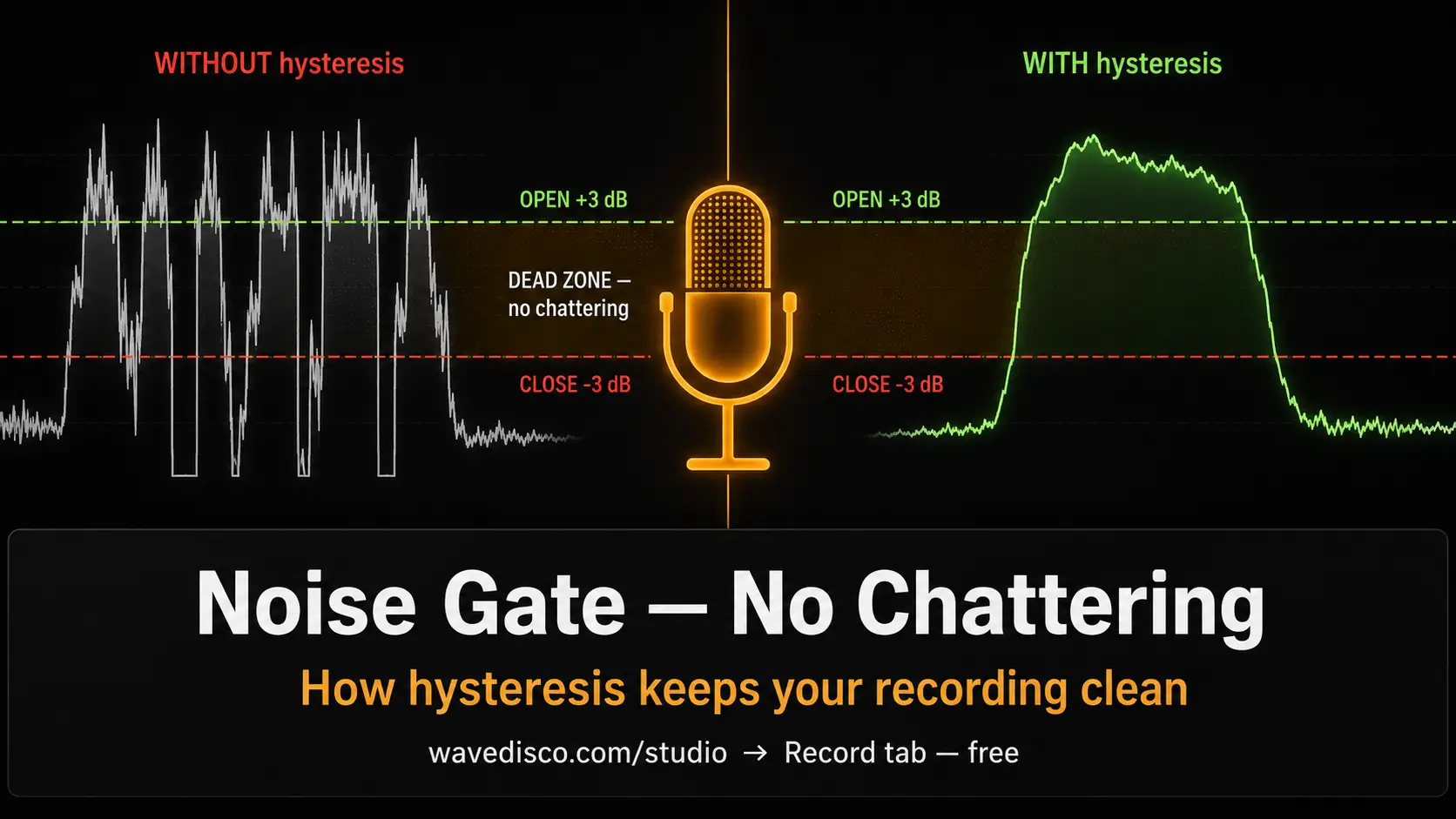
If you've tried recording vocals through a noise gate before, you've probably heard the problem: the gate flickers. It opens, closes, opens again, half a syllable at a time. The result sounds like the recording is stuttering.
This is called chattering. It happens when room noise sits right at the threshold — the signal bounces back and forth across the line, and the gate follows every crossing.
WaveDisco's noise gate handles this differently. Here's how.
What the noise gate is for
The noise gate in WaveDisco Studio is part of the Mic recording tab — it processes live microphone input in the browser. It's not part of the mastering chain (Quick, Auto-Master, or Manual modes apply to uploaded files).
When you record vocals or voice through the browser, WaveDisco disables the browser's built-in noise suppression — it tends to introduce phase artefacts and muffling that are worse than the noise it removes. The noise gate handles noise reduction instead, with more control over how transitions happen.
How a standard gate works
A simple noise gate has one threshold. When signal is above it, the gate opens. When signal falls below it, the gate closes. Clean in theory.
In practice: if room noise sits at -42 dB and your threshold is set to -40 dB, the signal crosses the threshold dozens of times per second. The gate opens and closes with each crossing. That's chattering.
The only fix with a single-threshold gate is to move the threshold further away from the noise floor — which means missing the quiet beginnings of words, or leaving a gap that cuts the start of syllables.
How hysteresis fixes it
WaveDisco's gate uses two thresholds, not one:
- Opens when RMS signal exceeds threshold + 3 dB
- Closes when RMS signal drops below threshold − 3 dB
The gap between these two points is 6 dB. That's the dead-band — a zone where the gate holds whatever state it's already in.
If room noise is at -42 dB and your threshold is set to -40 dB:
- The gate opens at -37 dB — well above the noise floor
- The gate closes at -43 dB — well below the noise floor
- The noise at -42 dB sits inside the dead-band and causes no transitions at all
The gate only changes state when the signal makes a real move — either rising clearly above the threshold or falling clearly below it. Chattering stops.
The envelope: attack and release
Two timing constants control how fast the gate responds:
Attack: ~3 ms — the gate opens fast. When signal crosses the upper threshold, gain ramps up in about 3 milliseconds. This is intentionally quick: if the gate were slow to open, it would clip the beginning of consonants — the "p" in a word, the "t", the "s". At 3 ms the gate is fully open before the consonant transient even finishes.
Release: ~200 ms — the gate closes slowly. When signal drops below the lower threshold, gain fades over about 200 milliseconds rather than cutting immediately. This preserves breath tails, room decay, and the natural end of a syllable. A hard cut sounds like the recording stopped mid-breath. A 200 ms fade sounds like silence arrived naturally.
The threshold control
In the UI, one slider controls the threshold: from −60 dB to −20 dB, default −40 dB.
When the gate is switched off, the threshold is set internally to −80 dB — effectively bypassed, signal always passes through.
How to set it: bring the threshold down until room noise starts coming through, then raise it until the noise stops — but don't raise it further. The 6 dB dead-band does the rest. You don't need to overshoot to compensate for chattering that isn't going to happen anyway.
Why this matters
The 6 dB hysteresis is not a large number. But it's the difference between a gate that works and a gate that stutters.
Most simple noise gates in browser tools use a single threshold — it's easier to implement. The two-threshold approach requires tracking gate state across audio blocks, which is what the AudioWorklet processor here does: it remembers whether the gate is currently open or closed and only changes state when the signal crosses the opposite threshold.
The result is transitions that happen once, cleanly, and stay.
Related: WaveDisco Studio Guide · How to Analyze Your AI Music · DJ Mode Guide