By Serj · July 2026 · 5 min read
When I was building WaveDisco, I ran into a problem I couldn't explain.
I'd put a limiter on the signal, set it to 0 dBFS, and the track would measure clean. No peaks above the ceiling. The limiter said everything was fine.
Then I'd export the file, open it in a different player, and hear distortion on the loud moments. Not always. Not on every track. But enough times that I knew something was wrong with my understanding, not with the track.
It took me a while to find the answer. The answer is true peak.
What a regular limiter actually measures
Audio files are made of samples — individual measurements of sound, taken thousands of times per second. At 44,100 Hz, your file contains 44,100 samples per second per channel.
A regular limiter looks at these sample values and catches anything above the ceiling. If you set the ceiling to 0 dBFS, it finds every sample that would exceed that value and pulls it back.
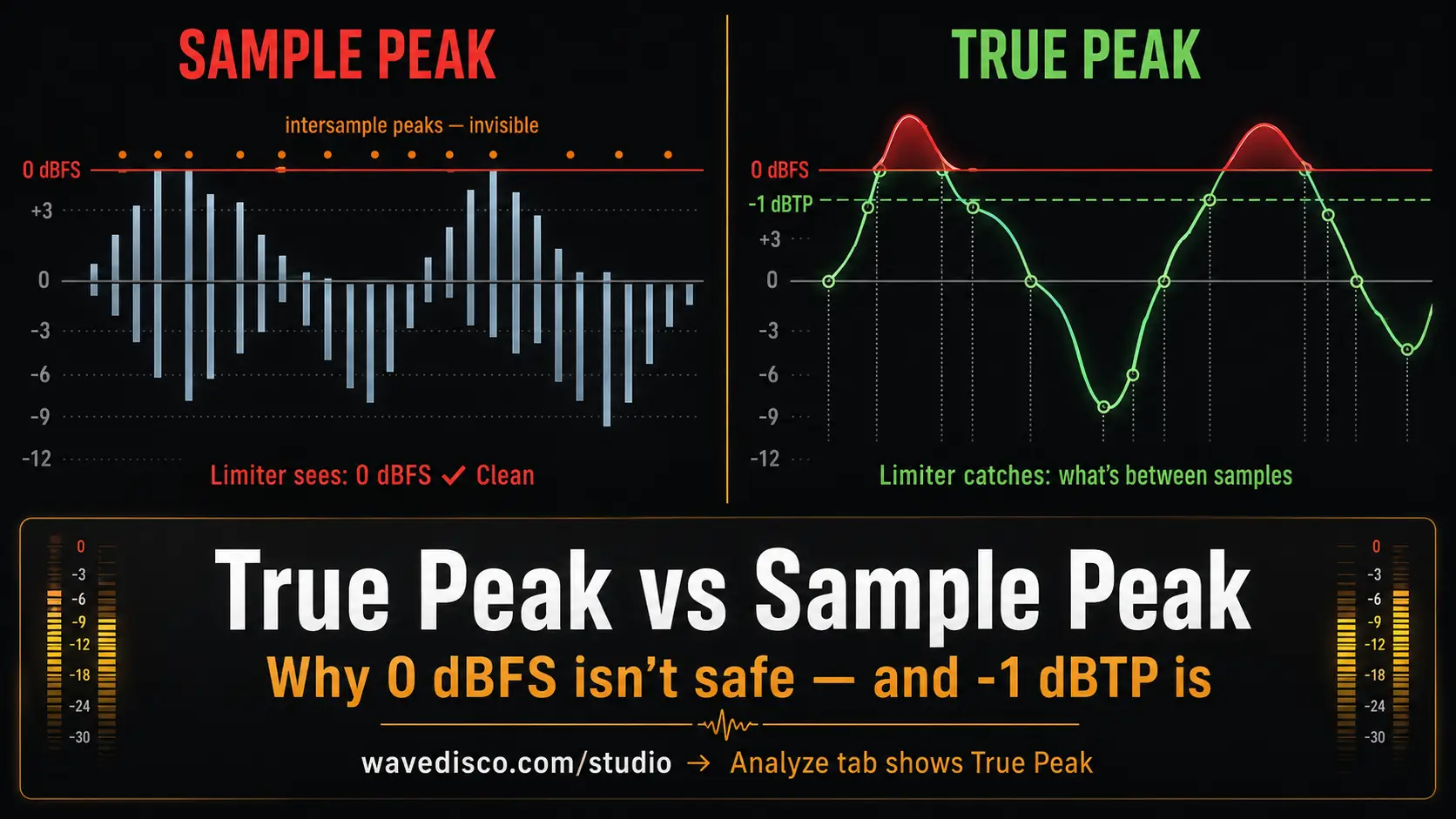
The problem: audio doesn't exist only at the sample points.
When a digital audio file plays back, the system reconstructs the continuous sound from those discrete samples using a process called interpolation. The actual audio signal passes through every point between the samples — and that signal can peak higher than any individual sample value.
These are called intersample peaks. They don't appear in the sample data. A regular limiter looking at sample values cannot see them. It reports the track as clean because, by its measurement method, it is.
What true peak actually measures
True peak metering works by upsampling the audio — typically 4x — before measuring. At 4x oversampling, you're measuring at 176,400 points per second instead of 44,100. This denser measurement captures what happens between the original samples.
The result is the actual maximum level the audio signal will reach during playback reconstruction — not just the maximum sample value.
The difference between sample peak and true peak on a typical Suno export is usually 0.5 to 2 dB. That gap is where the distortion lives.
Why streaming platforms care
Spotify, Apple Music, YouTube — they all process audio through playback systems that reconstruct the signal from samples. When a file with intersample peaks above 0 dBFS goes through that reconstruction, the signal clips.
The platform can turn your track down. It cannot remove clipping that was baked into the file before it arrived.
The standard used by streaming platforms is EBU R128. It specifies a true peak ceiling of -1 dBTP — one decibel below the absolute limit, measured in true peak, not sample peak. That one decibel of headroom is specifically reserved for intersample peaks that sample-based measurement wouldn't catch.
If your limiter is set to 0 dBFS and measuring sample peaks, you might be sending tracks with true peaks at +0.5 or +1 dBTP. Inside the platform's playback chain, those become distortion.
How I found this while building WaveDisco
When I built the first version of the limiter in WaveDisco, I used sample peak measurement — it was simpler to implement. The limiter reported clean output. But on some tracks, particularly dense Suno exports with a lot of simultaneous high-frequency content, I kept hearing brief artifacts after export.
I eventually traced it to intersample peaks. The limiter was catching the samples but not what happened between them.
The fix was to measure true peak using oversampled analysis before the ceiling is enforced, then set the ceiling at -1 dBTP rather than 0 dBFS. WaveDisco now uses -1 dBTP as the default ceiling — the same standard streaming platforms expect.
The Analyze tab shows the true peak reading for your track before you process it. If you see a value above -1, there are intersample peaks that will cause distortion on streaming platforms. The limiter brings that down to -1 dBTP before export.
What this means practically
When you're choosing a tool to master AI music, one question worth asking: does it use true peak limiting or sample peak limiting?
Sample peak limiting is technically easier to build and still common in simpler tools. It will produce a number that looks correct — 0 dBFS — while missing the intersample content that causes real distortion.
True peak limiting requires oversampled measurement and a ceiling set below 0 dBFS. The industry standard is -1 dBTP. Some engineers use -0.5 dBTP for extra margin.
For Suno and Udio tracks specifically, this matters more than it does for professionally recorded audio. AI generators tend to produce dense high-frequency content — synthesized hi-hats, layered textures, pad harmonics — that creates more intersample activity than a typical recorded instrument. A track that sounds clean on sample peak can have significant true peak violations.
The short version
Sample peak measures the samples. True peak measures what the audio actually does between them.
A limiter set to 0 dBFS, measuring sample peaks, is not the same as a limiter set to -1 dBTP, measuring true peak. The difference is real distortion that appears after the platform reconstructs your audio for playback.
The standard is -1 dBTP. Use a tool that measures and limits to that standard.
WaveDisco Studio shows your track's true peak in the Analyze tab and limits to -1 dBTP on export — free, in the browser, no account needed.
Related: What Is LUFS · How to Fix Clipping · Suno Mastering Online